Beatmatching by ear
A step by step method for matching the tempo and timing of two tracks using only your ears, plus how to fix drift and when sync is fine.
What beatmatching means
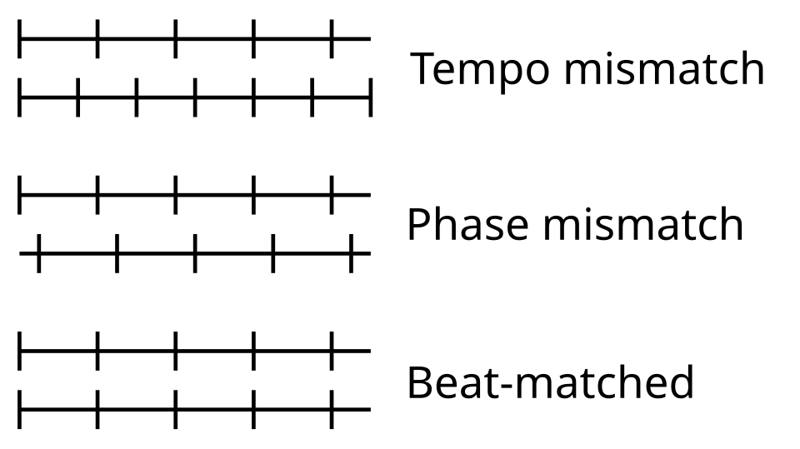
Beatmatching is getting two tracks to play at the same tempo, with their beats landing at exactly the same moment. When it is right, the kick drums of both tracks hit together as one. When it is off, you hear a "galloping" double kick, often described as horses running down stairs.
Two things have to match:
- Tempo: both tracks running at the same BPM (beats per minute).
- Phase: the beats lining up in time, so beat one of a bar in the new track lands on beat one in the playing track.
The technique grew out of disco clubs in the late 1960s and 1970s, where DJs such as Francis Grasso blended records so the dancing never stopped. Read more in the disco era.
Before you start
- Pick two tracks in the same genre with a simple, steady four-on-the-floor kick (house is ideal).
- Hide the BPM display or cover it with tape if you want true ear training.
- Turn sync off.
- Set your headphones so you can hear the cued track clearly. See cueing.
The method, step by step
- Play track A to the room at a comfortable volume.
- Cue track B in your headphones and set a cue point on its first clear kick drum.
- Start track B on a downbeat of track A. Release or press play exactly as track A hits the first beat of a bar.
- Listen for drift. Within a few seconds the kicks will drift apart. Ask: is track B rushing ahead or dragging behind?
- Correct the phase. Nudge track B's jog wheel or platter edge to pull it back into line. Push forward if it is behind, slow it with a fingertip on the platter edge or jog if it is ahead.
- Correct the tempo. If B keeps rushing, lower its pitch fader slightly. If it keeps dragging, raise it slightly.
- Repeat nudge then adjust, with smaller and smaller moves, until the kicks stay together for 16 bars or more without touching anything.
- Check in both ears. Use the cue/mix knob or one ear on, one ear off to hear both tracks together.
Hearing whether it is fast or slow
This is the hardest part for beginners. Try these tricks:
- Focus on the hi-hats. They are higher and sharper than the kick, so drift is often easier to hear.
- Make a deliberate error. Push the pitch noticeably too fast, listen to what "fast" sounds like, then come back.
- Count out loud. "One, two, three, four" over track A, then check whether B's kick lands before or after your count.
Fixing drift during a mix
Even matched tracks can drift, especially older recordings played by live drummers or vinyl with tiny speed variations. Keep one hand near the jog wheel during long blends and make small nudges instead of big pitch jumps. Big pitch moves mid-blend are clearly audible to dancers.
Common problems
| Problem | Likely cause | Fix |
|---|---|---|
| Galloping kicks | Phase is off | Nudge the jog wheel |
| Matches, then drifts | Tempo slightly wrong | Small pitch fader move |
| Track sounds chipmunk-like | Pitched too far | Choose a closer BPM or use key lock |
| Cannot hear cue | Booth too loud | Lower booth, use cue/mix |
Should you use sync?
Sync is a useful tool, especially for complex performances with loops, effects and four decks. But beat grids can be wrong, files can be misanalyzed, and some setups do not have sync at all. DJs who can beatmatch by ear can fix problems instantly and are never stuck. A good approach is to learn by ear first, then use sync when it frees you to focus on phrasing, EQ and the crowd.
Practice in short sessions. Ten focused beatmatching attempts a day for two weeks will teach your ears more than one long session per week.