CDJs and media players
The club standard decks that play music from USB sticks, how they evolved from CD players, and the features that matter when you play out.
What a CDJ is
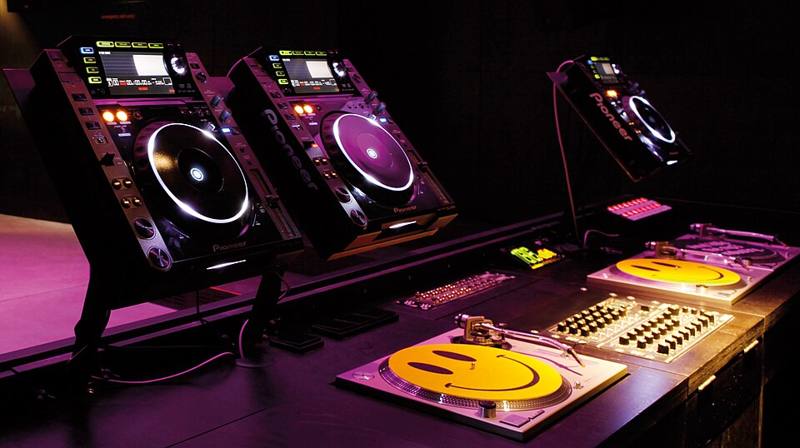
"CDJ" started as the name of Pioneer's DJ CD players, but the word is now used for almost any professional tabletop DJ player. The first Pioneer CDJ, the CDJ-500, arrived in 1994. Later models added a large touch-sensitive jog wheel that behaves like a record, and in 2001 the CDJ-1000 helped convince many vinyl DJs that digital decks could feel natural.
Modern club players usually skip CDs entirely. They read music from USB drives or SD cards, and some can stream from online services. Pioneer DJ, which is now part of AlphaTheta, Denon DJ and others make players for this market. Because one brand has been in so many club booths for so long, many venues list it in their tech rider, but the skills transfer between brands.
The parts of a media player
- Jog wheel. Spin the top to scratch or nudge the track; touch the edge to bend the pitch gently while beatmatching.
- Pitch or tempo fader. Usually adjustable range (for example 6, 10 or 16 percent, or wide).
- Cue and Play buttons. The cue button jumps back to a set point; holding it plays from there until you release.
- Hot cues. Buttons that save and recall points in a track instantly.
- Loop controls. Auto loops of 1, 2, 4, 8 or more beats, plus manual in and out points.
- Screen. Shows the waveform, beat grid, BPM, key and your library.
- Link connection. Networked players can share one USB library and send tempo information to each other.
How music gets onto the stick
On club players you do not drag files onto a USB stick at random. You prepare your library in management software, such as rekordbox for Pioneer and AlphaTheta players or Engine DJ for Denon players. The software analyzes each track for BPM, beat grid, key and waveform, and saves your cue points and playlists. When you export to the USB, the player reads that analysis instantly.
Carry two USB sticks with the same exported library, ideally from different brands. Sticks fail, and a backup in your pocket can save a night.
Standalone players vs controllers
Media players are standalone: no laptop needed. That makes club changeovers quick, since the next DJ just plugs in a stick. The trade-off is cost. A pair of current flagship players plus a club mixer costs far more than a capable controller. Many DJs practice at home on a controller that copies the club layout, then use the club's players when they get booked. See the gear comparison for a full side by side.
Key features compared
| Feature | Why it matters | Who needs it |
|---|---|---|
| Large jog wheel | Vinyl-like feel, scratching | Scratch and hip hop DJs |
| Key detection and key lock | Harmonic mixing without pitch shifting | Everyone |
| Beat sync | Automatic tempo matching | Useful, but learn by ear too |
| Slip mode | Track keeps playing silently underneath loops and scratches | Performance DJs |
| Networking | Shared libraries between decks | Club installs |
| Streaming support | Play tracks you do not own as files | Depends on venue internet |
Habits for club players
- Export your library and test the stick on the same player model if you can.
- Check the file formats the player supports. MP3, AAC, WAV and AIFF are widely supported; FLAC support depends on the model.
- Learn where the "eject" and "load" functions are so you can change sticks without stopping the music.
- Turn off "auto cue" or learn what it does, so tracks start where you expect.
- Never unplug a stick from a player that is currently playing a track from it.
For the history of how DJs moved from records to files, read the turntable as an instrument and the vinyl revival.